


Next: Module kramer - a Up: USERS MANUAL Workshops available Previous: Programs for Manipulation of Contents Index
export A= $(echo 23.5-7/2.6e-23*$B | bc -l ).
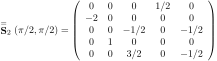 ,
,
 ,
,
 with
with
 and
and
 ,
,
 is the rotation angle in degree.

 input: calc1.bat, calc2.bat ...    scripts (bat files)
                                   (must be located in the current directory)
 output: stdout      ...........   html file created from the scripts
                                   (use ">" to pipe into file)

In order to create a latex output use script2html -latex.

 options: -fromline 3 ..........  only part of the file is html coded starting at line 3
          -toline   10 .........  only part of the file is html coded (until line 10)

 Many html commands such as <h1> HEADER </h1> can be used in
 script commments to structure the text. Latex formulas are accepted by enclosing it
 in brackets  \( \) for inline or \[ \] for equations  , e.g.  \(e^{ipi}+1=0\)
 Some abbreviations are acceptable:
  \( ... \)      --> € ... €
  <ol><li>         --> /§
  </li><li>        --> §
  <li></ol>        --> §/

 Other useful html commands are:
 REM <h1> A Header </h1>
 REM <h2> A smaller header </2>
 REM <img src="figure.jpg">
 REM <figure> <figcaption> This graph shows ...
 REM </figcaption> <img src="figure.jpg"> </figure>

  example:

 script2html calc.bat notes.txt > calc.bat.html

 [creates the html file calc.bat.html from files calc.bat and notes.txt]